Projector Comparison
Aurzen D1R vs HAPPRUN K7 Pro: Which Projector Fits Your Room?
A compact Roku projector or a larger Google TV setup? The right choice depends on where you will use it and which features matter to you.
This comparison contains paid links. We may earn a commission at no extra cost to you. Affiliate disclosure.
Jump to the quick decision tool ↓Quick Verdict
The 3.1 lb D1R has the smaller documented body and is the more portable choice for a dorm or bedroom where storage matters. The 7.05 lb K7 Pro makes more sense as a room fixture if you prefer Google TV and its listed dual 10W speakers. Both have documented 1920 × 1080 resolution. HAPPRUN claims 3000 ANSI lumens for the K7 Pro, but SWG has not measured either projector or established bright-room performance.
Buy D1R if…

Compact Roku room setup
Aurzen D1R
Choose the D1R when carrying, storage, and a smaller documented footprint matter in a dorm or bedroom.
(paid link)
Buy K7 Pro if…
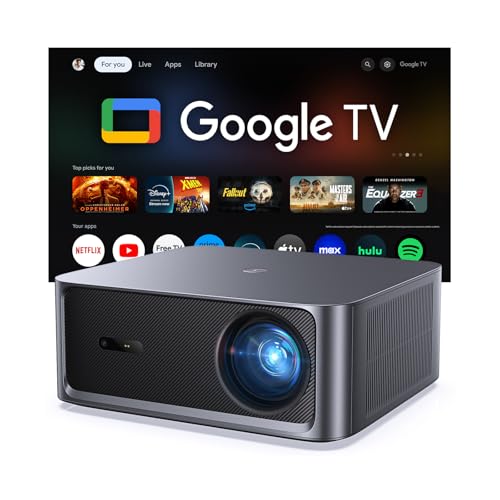
More permanent Google TV setup
HAPPRUN K7 Pro
Consider the K7 Pro when Google TV, its listed speaker hardware, and a larger fixed setup matter more than easy carrying.
(paid link)
Quick decision tool
Which projector fits you better?
Question 1 of 6
Where will you use it most?
D1R vs K7 Pro at a glance
| Specification | Aurzen D1R | HAPPRUN K7 Pro |
|---|---|---|
| Built-in platform | Built-in Roku TV | Built-in Google TV |
| Display resolution | 1920 × 1080 (manufacturer-listed native) | 1920 × 1080 panel resolution (K7 Pro manual) |
| Brightness listing | 280 ANSI lumens (manufacturer-listed) | 3000 ANSI lumens claimed by manufacturer; not independently measured by SWG |
| Weight | 3.1 lb / 1.4 kg (manufacturer-listed) | 7.05 lb (K7 Pro manual) |
| Dimensions | 9.1 × 7.5 × 3.2 in (manufacturer-listed) | 11.34 × 10.43 × 4.47 in (K7 Pro manual) |
| Focus / keystone | Auto focus and auto keystone | Auto focus and electric keystone (K7 Pro manual) |
| Built-in speakers | Two 5W speakers; Dolby Audio listed | Two 10W speakers; Dolby Audio listed |
| Ports | HDMI 1.4 × 1; USB 2.0 × 1; audio out × 1 (manufacturer-listed) | HDMI × 1; USB × 1 input; 3.5mm headphone output (K7 Pro manual) |
| Throw ratio | 1.28:1 (manufacturer-listed) | — |
Roku TV or Google TV
The D1R integrates Roku TV; the K7 Pro integrates Google TV. Choose the system that carries the apps and interface you actually want. Check campus network sign-in and account requirements before relying on either in a dorm. SWG has not tested streaming speed, app availability, or campus Wi-Fi compatibility.
Brightness claims and room light
Aurzen lists 280 ANSI lumens for the standard D1R. HAPPRUN rates the K7 Pro at 3000 ANSI lumens. Both figures come from the brands, and we have not independently measured either unit. We cannot convert these listings into a real-world brightness ratio or promise a usable image in a bright room.
For either model, control ambient light where possible and consider your intended screen size. A larger image can look dimmer from the same projector. The K7 Pro's marketing position does not establish daylight performance.
Size, weight, and storage
Aurzen lists the D1R at 3.1 lb / 1.4 kg (manufacturer-listed) and 9.1 × 7.5 × 3.2 in (manufacturer-listed). The K7 Pro manual copy lists 7.05 lb (K7 Pro manual) and 11.34 × 10.43 × 4.47 in (K7 Pro manual). Those documented differences make the D1R easier to plan around when moving or storing it. They do not measure carry comfort or durability.
The K7 Pro is a more natural fit for a stable shelf or another planned location. In either case, leave room for ventilation, a power connection, and a clear projection path.
Setup and placement
Both records list automatic focus and keystone features. The K7 Pro manual also describes electric focus and keystone adjustment. These features do not remove the need to measure throw distance and wall or screen size. SWG has not timed either setup process.
Aurzen lists a 1.28:1 throw ratio for the D1R, but its product page gives conflicting 60–150-inch and 60–200-inch projection ranges. The reviewed K7 Pro documentation does not establish a throw ratio. Confirm placement using your room measurements and current model-specific guidance before buying.
Native resolution and 4K support
Aurzen explicitly lists a native 1920 × 1080 panel for the D1R. The K7 Pro manual copy lists 1920 × 1080 resolution. HAPPRUN's “4K supported” wording describes accepted or decoded content, not a native 4K display. These records do not establish a picture-quality winner for color, contrast, sharpness, motion, or processing.
Built-in audio
Aurzen lists two 5W speakers for the D1R. HAPPRUN lists two 10W speakers for the K7 Pro, and both brands list Dolby Audio. The K7 Pro has more listed speaker power, which can matter to a buyer planning a more permanent setup, but wattage is not a sound-quality or loudness test. SWG has not listened to either projector.
Ports and student devices
Aurzen documents one HDMI 1.4 port, one USB 2.0 port, and one audio output on the D1R. The K7 Pro manual copy lists one HDMI and one USB input plus a 3.5mm headphone output. Check the output and adapter requirements of your laptop, console, or streaming device before relying on a particular connection.
Which fits your student setup?
D1R is likely a better fit when
- Storage space and carrying weight matter.
- You prefer built-in Roku TV.
- Your projector will move between a desk, shelf, or another room.
K7 Pro is worth considering when
- You prefer built-in Google TV.
- A stable, larger-footprint setup suits your room.
- Its listed dual 10W speaker hardware matters to you.
Neither pick guarantees an image size or viewing quality in your room. Measure the location and check your lighting, power, and shared-space constraints first.
FAQ
Is the K7 Pro native 4K?
No. Its manual copy lists 1920 × 1080 resolution. “4K supported” is not a native 4K claim.
Is the K7 Pro proven brighter in a real room?
No. HAPPRUN claims 3000 ANSI lumens, but SWG has not independently measured brightness or bright-room usability for either model.
Which is easier to carry?
The D1R has the smaller documented body and weighs 3.1 lb versus the K7 Pro manual's 7.05 lb. We have not personally carried either projector.
Have you tested either projector?
No. This is source-based research and editorial use-case guidance, not hands-on testing.
Research method and sources
Research checked: October 2026. Product identities and images come from existing Article 11 research. We used Aurzen's standard D1R product page, HAPPRUN's K7 Pro page, and a K7 Pro manual copy hosted by the independent Manuals+ site. The manual names model K7 Pro and lists its resolution, dimensions, weight, and ports; its independent host is identified so readers can judge provenance.
SWG has not personally tested image quality, brightness, audio, fan noise, throw distance, streaming, or long-term reliability. HAPPRUN's brightness figure is a manufacturer claim. Earlier price snapshots are omitted because prices change.
Final verdict
Choose the D1R when a compact, lighter Roku projector is the practical match for a shared or frequently rearranged room. Consider the K7 Pro when Google TV, its listed audio hardware, and a more permanent setup align with your plans. Portability favors D1R; neither source record supports a hands-on picture or sound-quality winner.