AV Access KVM buying guide · 2026
iDock C20 vs B10: Which KVM Dock Fits?
Two computers, two monitors, one desk. Your computer connections decide which dock is worth considering—not the bigger 8K label.
First, choose your setup
Not sure which connection your computer supports? Use the optional setup check below.
Two USB-C laptops + two external monitors
AV Access iDock C20

B0CP4PD3SMRight setup: Two compatible Windows USB-C laptops sharing two monitors.
Oct 16 listing: $233.99
ASIN B0CP4PD3SM · Price may change
Why pay for this dock? Leave both laptops connected. Switch the two monitors and keyboard/mouse between them, with up to 60W charging for each laptop.
Check first: Both laptop USB-C ports must carry video; most Macs will not get two independent screens.
(paid link)
One USB-C laptop + one desktop gaming/work PC
AV Access iDock B10
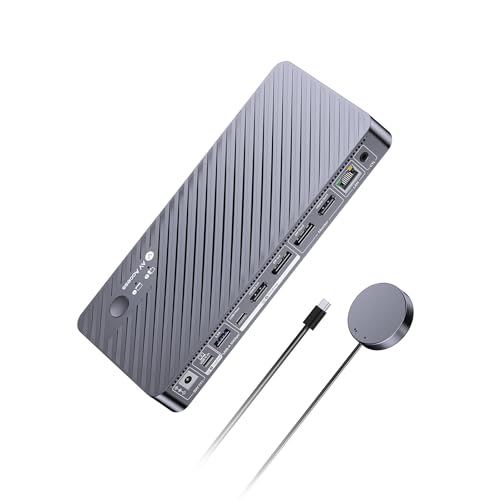
B0F6MTC9LRRight setup: One USB-C work laptop + one HDMI/DisplayPort desktop PC.
Oct 16 listing: $251.99
ASIN B0F6MTC9LR · Price may change
Why pay for this dock? Use your work laptop and gaming/desktop PC with the same two monitors and peripherals—plus up to 100W laptop charging.
Check first: Desktop needs HDMI and DisplayPort video outputs; dual 8K is not the laptop output.
(paid link)
Unsure about compatibility? Try the 20-second setup check
Select your computer setup above for a fit recommendation. This is a guide, not a compatibility guarantee.
Updated October 16, 2026 · Research based on manufacturer documents and exact-ASIN listings · Not hands-on tested.
C20 vs B10: what actually changes?
Same goal: share peripherals and two monitors. Different computer inputs, display outputs and charging.
Computer inputs
C20
Two USB-C laptops
B10
USB-C laptop + HDMI/DP desktop
Monitor outputs
C20
Two HDMI
B10
One HDMI + one DisplayPort
Max display mode
C20
Up to dual 4K@60Hz (compatible Windows MST hosts)
B10
Laptop: up to dual 4K@60Hz; desktop: up to dual 8K@60Hz
Laptop charging
C20
Up to 60W per laptop
B10
Up to 100W for laptop
EDID support
C20
Yes
B10
No
Remote switch
C20
Optional add-on
B10
Included wired remote
Mac dual extended screens
C20
Not generally supported
B10
Not generally supported on normal single-cable path
| Buyer check | C20: two laptops | B10: laptop + desktop |
|---|---|---|
| Computer inputs | Two USB-C video-capable laptops | USB-C laptop + HDMI/DisplayPort desktop |
| Monitor outputs | Two HDMI | One HDMI + one DisplayPort |
| Max display path | Dual 4K@60Hz with supported Windows MST hosts | Laptop: dual 4K@60Hz; desktop: dual 8K@60Hz, dependent on hardware |
| Laptop charging | Up to 60W per laptop | Up to 100W for laptop |
| EDID emulation | Yes | No |
| Wired remote | Optional EXB01 | EXB01 included |
| Mac dual extended displays | Not generally supported on single USB-C path | Not generally supported on normal single USB-C path |
Advertised maximums depend on host, GPU, cables, and monitors. Verified against manufacturer documentation; not measured by SWG.
Found your matching setup?
Compare the live checkout price before you buy; recheck your video ports and Mac display needs.
(paid link)
(paid link)
Three checks that prevent a wrong purchase
- USB-C video: A charge-only port cannot drive two displays. Check DP Alt Mode and MST support.
- B10 8K: Dual 8K is a desktop-path maximum, not the USB-C laptop output.
- Mac: A second screen may mirror instead of extend. Read the Mac warning →
C20: why choose a $200+ dock for two laptops?
If you alternate between two compatible Windows laptops, you are paying to avoid repeatedly unplugging monitors, USB peripherals and adapters—not just to add another port.
- One shared desk: switch two monitors and keyboard/mouse between laptops while keeping both plugged in.
- Fewer adapters: HDMI displays, USB devices, Gigabit Ethernet and SD expansion from one dock.
- Both laptops stay powered: the manufacturer rates charging at up to 60W per connected laptop, subject to load.
Two video-capable USB-C laptops, and these conveniences matter to you?
(paid link)
C20 compatibility, limitations & firmware details
Do not choose it for a standard HDMI/DP desktop as the second machine, USB-C ports without video output/MST, two independently extended Mac monitors, or laptops needing more than 60W charging under load.
Switching detail: EDID emulation helps retain monitor arrangements. AV Access lists standard KVM switching and an optional USB Mode to show one computer per monitor while moving peripherals; that USB Mode requires updated firmware. It does not solve the Mac MST restriction.
B10: one desk for your work laptop and desktop PC
If you finish work on a USB-C laptop and switch to a gaming or workstation desktop, the B10 lets them share your two monitors and input devices without swapping display cables each time.
- Separate computer inputs: one USB-C laptop plus a desktop connected through HDMI and DisplayPort.
- Desktop display headroom: up to dual 8K@60Hz on the supported desktop path, dependent on GPU, cables and monitors—not dual 8K from the laptop.
- Laptop docking: up to 100W laptop charging, shared USB peripherals and an included wired switch remote.
Have a USB-C laptop and a desktop with the right video outputs?
(paid link)
B10 compatibility, limitations & display details
Skip it if you need two USB-C laptop inputs, independent Mac dual-screen extension over a single USB-C path, or EDID emulation: the manufacturer does not list EDID support on B10.
Resolution detail: the USB-C laptop path is rated up to dual 4K@60Hz under supported conditions. The higher dual 8K desktop specification needs suitable GPU, video connectors, monitor inputs, cables and settings. A 1080p-only setup may not benefit from the higher bandwidth.
MacBook buyer? Read this before either dock
macOS generally does not implement DisplayPort MST as independent extended desktops through these standard single USB-C dock connections. On both C20 and B10, two attached monitors may mirror rather than become two separate workspaces. MacBook chip generation, whether its lid is open, and the number of actual display signal paths are separate compatibility constraints.
Do not buy either model solely on the assumption that “dual monitor” means dual independent Mac screens. AV Access instead directs qualifying MacBook + desktop buyers to iDock M10 manufacturer compatibility details ↗. That alternative still depends on the exact Mac model and display capabilities; it is not a guaranteed fix for every Mac.
Five checks before spending $200+
- Count your computer types, not just computers. Two compatible USB-C laptops → C20. Laptop + desktop HDMI/DP output → B10. Two desktops or other connections → consider a different model.
- Check each host’s video specification. USB-C charging/data support alone does not guarantee DP Alt Mode or MST. Confirm the real model, GPU and operating system.
- Check the monitor connectors and performance target. C20 uses two HDMI outputs. B10 uses HDMI + DisplayPort outputs. Your monitor ports, refresh rates and cable standards must match.
- Check power and included accessories. A high-draw laptop may need its own charger even when a dock supplies 60W or 100W. The C20 remote is optional; the B10 remote is included in the documented box contents.
- Check live checkout price, SKU and returns. Oct 16 price snapshots are not guaranteed offers. A wrong-variant order can defeat even a strong discount; double-check ASIN and compatibility before checkout.
Final verdict: choose the input layout, not the bigger number
For two compatible Windows laptops, the C20 is the more sensible first product to assess: it supplies two laptop USB-C inputs, 60W charging per laptop, and EDID support. For one Windows laptop and one desktop gaming/workstation PC, the B10 offers the correct input arrangement and higher desktop video bandwidth. Neither is a safe universal choice for dual independent MacBook displays.
(paid link)
(paid link)
If your setup is different, a simpler KVM or a normal USB-C dock may cost less and fit better. Compare general-purpose laptop docks →
Questions buyers should ask
Can I use the C20 with one laptop and one desktop?
Not in the usual HDMI/DisplayPort desktop topology. C20 has two USB-C computer inputs. If the desktop provides a verified compatible full-featured USB-C video path, confirm its exact support with AV Access; otherwise the B10 is the intended laptop + desktop choice.
Does the B10 let my work laptop run two 8K monitors?
No. The manufacturer reserves dual 8K@60Hz for the supported desktop path. On the USB-C laptop path, it lists up to dual 4K@60Hz under suitable host conditions.
Does either dock allow two independent external displays from a MacBook?
Do not assume so. Both manufacturers warn of mirroring with their usual single-cable Mac path. Check your exact Apple chip and the M10 alternative if two true extended Mac displays are essential.
Does the C20 charge both laptops, even while one is inactive?
AV Access states both connected laptops can receive up to 60W charging simultaneously. High-load laptops may still require their own chargers.
Do these products need special drivers or a firmware update?
Core KVM switching uses the documented hardware connections. For C20, the newer split-screen USB Mode requires an updated firmware per AV Access. Confirm the version and read official instructions before updating.
Why pay for a KVM dock instead of a cheaper USB switch?
A USB switch shares peripherals; these KVM docks also route monitors and add laptop docking features. If you do not need to switch video displays, a basic USB switch may be a better value.
Is this a hands-on review?
No. We used manufacturer specifications and exact-ASIN publisher listings. We have not independently measured latency, display switching time, USB throughput, thermals, or long-term reliability.
Research method and sources
We compared the product identities and US ASINs in the October 16 PartnerBoost listing with manufacturer documentation. We use dated prices only as decision context, not as live price claims. We have not personally tested these docks and do not reproduce merchant review-star averages as independent SWG ratings. Compatibility limits and who should not buy are prioritized over promotional descriptions.
- AV Access iDock C20 — official specifications, supported connections, FAQs ↗
- AV Access iDock B10 — official specifications and display path limits ↗
- AV Access C20 troubleshooting and host compatibility ↗
- C20 exact US ASIN: B0CP4PD3SM ↗ · B10 exact US ASIN: B0F6MTC9LR ↗
Product photos above are sourced from the PartnerBoost US publisher listings for the exact ASINs. Listings, prices, availability, and firmware capabilities may change after this research date.