One USB-C laptop + one desktop PC · Dual-monitor KVM guide
AV Access iDock B10: Laptop + Desktop KVM
Share two monitors and peripherals between a USB-C work laptop and desktop PC. The advertised dual 8K is for a compatible desktop—not the laptop.
Best fit: Windows work laptop + HDMI/DisplayPort desktop
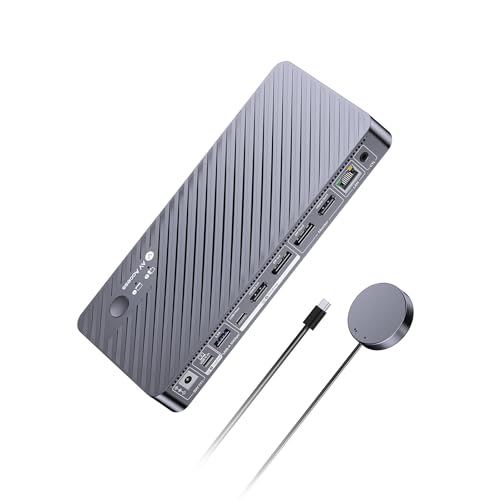
B0F6MTC9LRiDock B10
USB-C laptop + desktop HDMI/DP · HDMI and DP monitor outputs
Oct 16 US listing: $251.99
ASIN B0F6MTC9LR · Dated listing price, not live checkout
What makes it worth considering? Keep your work laptop and desktop connected to the same two monitors and shared keyboard/mouse. B10 also supplies up to 100W charging to the laptop and includes a wired switching remote.
Check first: The desktop needs compatible video outputs and a USB peripheral connection. B10 does not support EDID emulation, and ordinary macOS dual-screen extension is limited.
(paid link)
Why choose B10 over a cheaper KVM switch?
Imagine a Windows work laptop on weekdays and a desktop gaming PC at night. A basic USB switch shares peripherals but leaves monitor inputs and laptop charging to separate devices. The B10 is a combined KVM and dock: it can handle switching displays, peripherals and laptop docking functions together.
One desk, two computers
Share two monitors and USB peripherals; switch from work laptop to desktop without pulling video cables.
Charging for laptop work
Up to 100W USB-C laptop charging can replace a separate adapter if your host power needs fit.
A physical switch within reach
An EXB01 wired remote is listed as included, making it easier to change the active computer.
Save your money if: you only use one screen, never switch between machines, or need a simple USB hub. B10 is a poor default for two USB-C laptops because it has only one laptop-side USB-C host input.
How B10 fits a laptop + desktop desk
Simplified connection path
Video-capable USB-C
HDMI + DP video; USB data
↓ Different computer-side connections ↓
↓ HDMI + DisplayPort monitor outputs ↓
Illustrative wiring topology only. Confirm manufacturer connection diagram, correct host USB data connection, display connectors, cables and GPU capabilities before buying.
Fast check: You need a video-capable USB-C laptop, a desktop with HDMI/DP video and USB connectivity, and suitable display cables.
All five compatibility checks ↓
- Know your computer inputs. The laptop uses a video-capable USB-C upstream port. The desktop uses dedicated HDMI and DisplayPort video connections plus USB connectivity for shared peripherals.
- Know your monitor outputs. B10 has an HDMI and a DisplayPort monitor output. Both screens and cables must support your target modes.
- Respect the two resolution paths. AV Access rates qualifying desktop configurations up to dual 8K@60Hz; supported Windows laptops are limited to up to dual 4K@60Hz. These maximums depend on GPU, bandwidth, display and cabling.
- Budget laptop power correctly. B10 supplies up to 100W USB-C charging, not an unconditional guarantee that a heavy gaming laptop will run at peak load without its charger.
- Account for switching quirks. B10 does not have EDID emulation, so displays may reconfigure after switching. Its wired EXB01 remote is included, according to the manufacturer.
Does B10’s 8K headline matter for your desk?
Only if the desktop GPU, video outputs, monitors and cables can really use the bandwidth. The manufacturer's desktop figures reach up to dual 8K@60Hz or high-refresh 4K under supported conditions; the Windows USB-C laptop side tops out at dual 4K@60Hz. If you have ordinary 1080p monitors, the bigger number alone is not a reason to pay more.
Laptop source
Up to dual 4K@60Hz with suitable Windows USB-C video capability. High-refresh and ultrawide combinations vary.
Desktop source
Higher bandwidth, up to dual 8K@60Hz or supported 4K high-refresh modes, with qualified display hardware.
Real buying priority: correct HDMI/DP host and monitor connections matter more than using the word “8K” in a product title.
Have a USB-C laptop and a desktop with HDMI + DP?
If two displays, shared peripherals and up to 100W laptop charging match your desk, B10 is worth comparing at its current checkout price. Check whether EDID behavior and video cables meet your needs first.
(paid link)
What if both computers are laptops?
B10 is not designed with two USB-C laptop inputs. If you instead have two compatible Windows USB-C laptops and two HDMI monitors, the C20 two-laptop buying guide → is a better starting point. Or compare C20 vs B10 together → to see the key input and monitor-output differences.
B10 buyer questions
Can the work laptop output dual 8K displays?
No. The manufacturer lists up to dual 4K@60Hz on the supported Windows USB-C laptop path. The higher 8K configurations apply to eligible desktop connections.
Does it include a switching remote?
Yes. The manufacturer lists the wired EXB01 remote among the included accessories for B10. Confirm the selected retail variant.
Will B10 prevent monitor rearrangement when I change PCs?
Not necessarily. AV Access states that B10 does not support EDID emulation, so do not purchase it expecting that feature.
Could a MacBook use two independently extended external monitors?
Not by assuming the standard single-USB-C connection. Mac dual extended display support is limited; verify your exact Mac chip and manufacturer topology.
Have you measured B10 performance?
No. This is a manufacturer- and publisher-listing-based buying guide, not a hands-on review. Display throughput, switch times, heat and long-term durability are not independently tested by SWG.
Sources and limits
Checked October 16, 2026 against the AV Access manufacturer specifications and PartnerBoost US publisher listing for ASIN B0F6MTC9LR. The product image matches that publisher listing. $251.99 is a dated price snapshot, not a live offer. SWG has not bought or physically tested the B10.