Best Laptop Power Banks for College Students in 2026
Stay charged through libraries, classes, travel, and long study days with a laptop-capable USB-C power bank.
A laptop power bank can be one of the most useful pieces of student tech when the nearest outlet is occupied, across the library, or simply nowhere near your seat.
Not sure how laptop power-bank charging works? Read our guide to charging a laptop with a power bank.
Jump to top picks ↓Quick Picks
Choose your use case · Jump to the details
Laptop + phone carry with fewer loose cables.
- 25,000mAh
- 100W single USB-C
- 595g
Everyday USB-C laptops on a lighter budget.
- 20,000mAh
- 65W USB-C
- 323g
Demanding laptops and high-power workflows.
- 26,250mAh
- 140W single USB-C
- 99.75Wh
More capacity with useful 100W headroom.
- 25,000mAh
- 100W single USB-C
- 392.3g
Not sure what wattage or capacity you need?
Choose the right charging power and battery size before comparing individual models.
Can a Power Bank Charge a Laptop?
Understand USB-C PD, laptop compatibility, charging wattage, and cable requirements.
Read the charging guide →65W vs 100W Power Bank
Find out how much charging power your laptop actually needs.
Compare 65W vs 100W →20,000mAh vs 25,000mAh Power Bank
Choose between lighter daily carry and longer laptop runtime.
Compare capacity →Check your own laptop with the Laptop Power Bank Compatibility Checker →
Not sure whether your setup needs more battery life, more ports, or a better desk setup? Try the Product Finder to narrow down the right direction.
Quick Comparison
Swipe across the table to compare all eight columns.
| Product | Best for | Capacity | Max single USB-C | Max total output | Weight | Ports | Recharge input |
|---|---|---|---|---|---|---|---|
| Anker Laptop Power Bank 25K / 165W | Best Overall | 25,000mAh | 100W | 165W | 595g | 3 USB-C paths + 1 USB-A | 100W |
| INIU P62-E1 20K / 65W | Best Value | 20,000mAh | 65W | 65W class | 323g | 2 USB-C + 1 USB-A | 45W |
| Anker Prime Power Bank 26K / 300W | Best Premium / High-Power | 26,250mAh | 140W | 300W | — | 2 USB-C + 1 USB-A | Up to 250W dual-input under supported conditions |
| INIU P63-E1 25K / 100W | Best Balance | 25,000mAh | 100W | 110W-class dual USB-C distribution | 392.3g | 2 USB-C + 1 USB-A | 65W |
Maximum output numbers are not always available to one device. Multi-port charging can redistribute power, and the laptop itself determines how much USB-C power it can accept.
The challenge is that a portable charger that works well for a phone is not automatically a good laptop power bank. USB-C laptops can demand much more power, and the differences between 65W, 100W, and 140W charging matter more than another few thousand milliamp-hours on the label.
For most students, the goal is not to buy the biggest battery possible. It is to find the right balance between charging power, capacity, weight, price, and how many devices you actually carry.
We compared four laptop-capable USB-C power banks that cover very different student needs: a compact 65W value option, a balanced 100W model, a feature-rich Anker with built-in cables, and a premium 140W-class option for demanding laptops.
We have not personally tested these power banks. Our recommendations are based on manufacturer specifications, available product information, independent information where available, and practical student workspace use cases.
Best Overall: Anker Laptop Power Bank 25K / 165W

Anker
Anker Laptop Power Bank, 25,000mAh, 165W Total Output
Best OverallA flexible main portable power source with built-in cables for a laptop and smaller devices.
The Anker 25K is the cable-convenience choice for students carrying several devices. Its combined-output headline and single-laptop limit are different, and its weight is the main carry trade-off. The full review explains when those compromises make sense.
Key specs from the research
Manufacturer / retailer specifications; not personally tested. Unavailable fields are omitted.
- Compatibility
- USB-C laptops and other USB devices; check the laptop's charging requirements.
- Weight
- Approximately 595 g
- 25,000mAh; Anker states 90Wh
- 165W maximum combined output; up to 100W from an individual USB-C charging path
- Two built-in USB-C cables, one additional USB-C port, and one USB-A port
- Charges up to four devices
- Up to 100W recharging with compatible equipment
- Smart display
Best fit: Students who carry a laptop, phone, tablet, and accessories through long campus days.
Best Value for Most Students: INIU P62-E1 20K / 65W

INIU
INIU Laptop Power Bank, Smallest 20000mAh 65W Fast Charging Battery Pack
Best Value for Most StudentsLaptop-capable output and useful capacity in a lighter daily-carry option.
The P62 is the lighter value choice for an everyday USB-C laptop. Its lower capacity and reduced output when multiple ports are active matter more if you need long sessions or a demanding laptop. The full review examines that fit.
Key specs from the research
Manufacturer / retailer specifications; not personally tested. Unavailable fields are omitted.
- Compatibility
- Many USB-C laptops and smaller USB devices; 65W may not meet demanding laptop needs.
- Dimensions
- Approximately 4.3 × 2.8 × 1.1 in
- Weight
- Approximately 323 g
- 20,000mAh
- USB-C1 up to 65W output and 45W input
- USB-C2 up to 36W output; USB-A up to 18W
- Three output ports
- USB-C1 + USB-C2 approximately 45W + 20W when used together
Best fit: Students with efficient USB-C laptops who want a practical daily backup.
Best Premium / High-Power Pick: Anker Prime Power Bank 26K / 300W
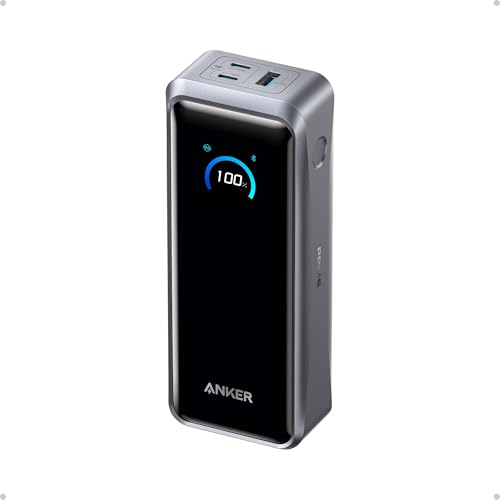
Anker
Anker Prime Power Bank, 26,250mAh 300W Fast Charging
Best Premium / High-Power PickThe performance-first option for demanding USB-C laptops and multi-device setups.
The Prime is the high-power choice for demanding USB-C setups. Its 300W figure is combined output rather than power to one laptop, and its premium positioning may be unnecessary for ordinary student workloads. The full review separates those use cases.
Key specs from the research
Manufacturer / retailer specifications; not personally tested. Unavailable fields are omitted.
- Compatibility
- USB-C laptops and other USB devices; up to 140W depends on device and compatible equipment.
- 26,250mAh / 99.75Wh
- Up to 300W combined output; up to 140W from a single USB-C port
- Two USB-C ports and one USB-A port
- Up to 250W dual-input recharging under supported conditions
- Smart display and app support
Best fit: Students with demanding laptops and power-heavy workflows who need the higher single-port output.
Best Balance of Capacity & Power: INIU P63-E1 25K / 100W

INIU
INIU Laptop Power Bank, Smallest 25000mAh 100W Fast Charging Battery Pack
Best Balance of Capacity & PowerA middle ground between compact 65W charging and premium high-power models.
The P63 offers a middle ground: more charging headroom and capacity than the P62, with less recorded weight than the Anker 25K. Multi-device use changes the available output. The full review covers that balance.
Key specs from the research
Manufacturer / retailer specifications; not personally tested. Unavailable fields are omitted.
- Compatibility
- USB-C laptops and smaller USB devices; check single-port and multi-port power needs.
- Dimensions
- Approximately 4.3 × 2.7 × 1.4 in
- Weight
- Approximately 392.3 g
- 25,000mAh
- USB-C1 up to 100W output and 65W input
- USB-C2 up to 45W output; USB-A up to 18W
- USB-C1 + USB-C2 approximately 65W + 45W when used together
- Detachable lanyard-style USB-C cable and power display
Best fit: Students who need more charging headroom than 65W without premium Anker pricing and weight.
Choosing between built-in cables and lighter daily carry? Compare Anker 25K vs INIU P63 →.
Deciding between the two INIU models? Compare INIU P62 vs P63 → for the charging-power, capacity, and carry trade-offs.
How Much Power Does a Student Laptop Actually Need?
The maximum wattage on a power bank is useful only if your laptop can take advantage of it.
If you are deciding between the common tiers, our 65W vs 100W guide explains how to check your laptop's USB-C charging requirements.
65W: enough for many everyday student laptops
A 65W USB-C power bank is a practical match for many MacBook Airs, Chromebooks, and thin-and-light Windows laptops.
For students doing note-taking, browser work, coding, writing, and typical coursework, 65W is often a sensible balance between portability and charging performance.
It may be less suitable for gaming laptops, workstation-class systems, or machines that expect 100W or more under load.
100W: more headroom
A 100W power bank gives larger USB-C laptops more room to charge quickly and is also useful when you want stronger performance from a MacBook Pro-class or higher-power Windows laptop.
For students who expect to keep a laptop for several years and want more charging headroom, 100W is a useful upgrade.
140W: for demanding setups
140W-class charging belongs in the premium tier.
It can make sense for compatible high-performance laptops, but it is unnecessary for many student computers.
Buying a 140W power bank does not force 140W into the laptop. USB-C power is negotiated between the charger and device, and the laptop draws only what it supports.
20,000mAh vs 25,000mAh: Which Is Better for Students?
Choosing between portability and runtime? See our 20,000mAh vs 25,000mAh comparison.
More capacity is useful, but it always comes with a cost in size and weight.
A 20,000mAh power bank is easier to justify as an everyday campus accessory. It can provide a meaningful laptop top-up while remaining much easier to carry than a large 25K or 26K model.
A 25,000mAh-class battery makes more sense when you expect long periods away from outlets, travel frequently, or want to charge a laptop plus several smaller devices.
Do not convert the advertised mAh number directly into a fixed number of phone or laptop charges.
Real usable energy is lower because of voltage conversion, heat, charging circuitry, and device efficiency.
The better question is:
"Do I want a lighter daily backup, or a heavier battery that can replace access to a wall outlet for longer?"
Can You Take a Laptop Power Bank on a Plane?
In the United States, the FAA bases lithium-ion battery rules on watt-hours rather than the headline mAh number.
Spare lithium-ion batteries and power banks must stay in carry-on baggage and cannot be placed in checked baggage.
Under current FAA guidance:
- 0–100Wh batteries are generally permitted for personal use
- 101–160Wh batteries require airline approval
- batteries above 160Wh are generally prohibited for passengers
Airlines and other countries can apply stricter rules, so always check the carrier before travel.
Anker explicitly rates the Anker 25K / 165W at 90Wh and the Anker Prime 26K / 300W at 99.75Wh.
For the INIU models, confirm the Wh marking printed on the actual battery and your airline's rules before flying.
What to Look for in a Laptop Power Bank
1. Single-port USB-C wattage
Look at the maximum output of one USB-C port, not just the largest number printed on the product page.
A "165W" or "300W" power bank may be describing combined output across several ports.
2. Capacity
20,000mAh is a useful daily-carry size.
25,000mAh and above provides more laptop runtime but usually adds noticeable weight.
3. Multi-port power sharing
If you plan to charge a laptop and phone simultaneously, check how power is divided when more than one port is active.
Maximum single-port output often drops during multi-device charging.
4. Weight
A power bank may look compact in a product image but still weigh more than half a kilogram.
For a backpack carried across campus every day, that matters.
5. Recharge speed
A high-capacity battery is much easier to live with if it can refill quickly between study sessions.
6. Built-in cables
Built-in cables reduce the number of accessories you need to remember, but they are not essential if you already carry a good USB-C cable.
Power Bank vs Wall Charger: Which Should a Student Buy First?
A wall charger is still the better first purchase if you normally study near an outlet.
It is smaller, lighter, cheaper, and does not need to be recharged itself.
A laptop power bank becomes valuable when access to outlets is unreliable: crowded libraries, long class days, commuting, travel, fieldwork, conferences, or study sessions away from a desk.
If the problem is not battery life but missing HDMI, Ethernet, USB, or SD-card ports, a USB-C hub may solve the problem more directly.
If you're building a permanent desk setup instead of a mobile one, a docking station may be the better fit.
Frequently Asked Questions
Is 65W enough to charge a laptop?
For many MacBook Airs, Chromebooks, and thin-and-light USB-C Windows laptops, 65W is a useful charging level. Higher-performance laptops may charge more slowly or may require 100W or more for their best performance.
Is a 100W power bank better than a 65W power bank?
Not automatically. A 100W model gives compatible laptops more charging headroom, but it is often larger, heavier, and more expensive. If your laptop normally uses 45W or 65W USB-C charging, a smaller 65W battery may be the better student purchase.
Can I use a laptop power bank for my phone?
Yes. USB-C power delivery negotiates power with the connected device, so a compatible phone does not simply receive the power bank's maximum laptop wattage.
Can a power bank charge a laptop while I am using it?
Usually, but the result depends on the laptop's power draw. If the computer consumes more power than the power bank supplies, the laptop battery can still discharge slowly even while connected.
Is 20,000mAh enough for college?
For many students, yes. It provides a useful emergency laptop top-up and substantial phone/tablet charging without the weight of a 25K-class battery.
Are laptop power banks allowed on airplanes?
Power banks are treated as spare lithium batteries and must be carried in carry-on baggage. FAA rules generally allow batteries up to 100Wh, while 101–160Wh batteries require airline approval. Always verify the Wh label and your airline's current policy.
Which Laptop Power Bank Should You Buy?
For most students who want the strongest combination of capacity, laptop charging, cable convenience, and multi-device support, the Anker Laptop Power Bank 25K / 165W is the best overall choice.
If budget and backpack weight matter more, the INIU P62 20K / 65W is the easiest value recommendation. It gives many everyday USB-C laptops useful charging performance without turning the power bank itself into another heavy piece of gear.
The INIU P63 25K / 100W is the better middle ground when 65W feels limiting but premium Anker pricing feels unnecessary.
The Anker Prime 26K / 300W belongs at the top end. Its 140W single-port capability and extreme total output are impressive, but most students do not need that level of portable power.
The right choice is not the model with the largest wattage number.
It is the lightest and least expensive model that can comfortably support the laptop and devices you actually carry.
Still not sure whether your workspace needs more battery life, more ports, or a different upgrade? Try the Product Finder.