Docking Station · Product Review
Anker Prime TB5 Docking Station Review: Who Actually Needs Thunderbolt 5?
A premium desk dock for compatible laptops and workflows that can use the extra connection headroom.
Research Verdict
Quick Answer
Consider it for a compatible high-end laptop, demanding displays, and fast external storage. Ordinary study peripherals alone are not a strong reason to buy the premium tier.
Before buying: Confirm the exact laptop, operating system, display arrangement, and charging requirements.
We may earn a commission at no extra cost to you. Disclosure
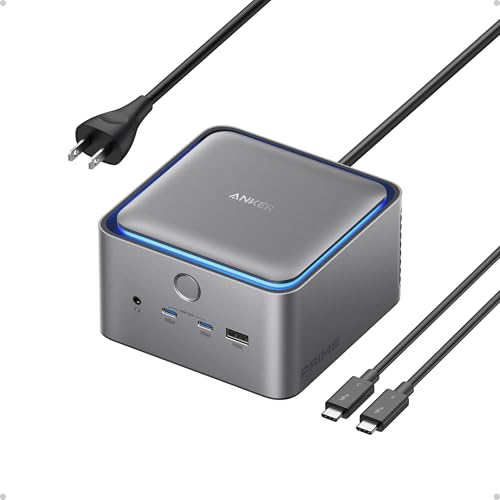
At a Glance
- Best for
- Best Premium
- Host interface
- Thunderbolt 4 and Thunderbolt 5 hosts
- Display support
- Selectable HDMI 2.1 or DisplayPort 2.1 connection
- Host charging
- Up to 140W host charging
We may earn a commission at no extra cost to you. Disclosure
Review Contents
Who this dock is for
Choose the Anker Prime TB5 if you already own a high-end Thunderbolt laptop and regularly move large files, connect fast storage, or use demanding external displays.
Key specs
- One Thunderbolt 5 upstream port and two downstream Thunderbolt 5 ports
- Selectable HDMI 2.1 or DisplayPort 2.1 connection
- Up to 140W host charging
- 2.5Gb Ethernet, USB-C, USB-A, audio, SD, and TF card readers
Recorded source claims, not SWG measurements. Unrecorded weight and dimensions remain unknown.
What stands out
The upstream and downstream Thunderbolt connections make it a different proposition from the USB-C Anker Prime. Its appeal is a capable central link for a demanding desk, rather than simply adding familiar ports.
Host connection and laptop requirements
Confirm the laptop’s exact connection standard and supported docking modes. A matching USB-C connector does not prove access to Thunderbolt capabilities. Use the recorded host requirements below as your starting point.
Recorded compatibility: Thunderbolt 4 and Thunderbolt 5 hosts; external-display support varies by Windows hardware and Apple silicon generation.
Display support
Selectable HDMI 2.1 or DisplayPort 2.1 connection
Treat the HDMI or DisplayPort option as selectable, not a promise of unrestricted simultaneous output from both. The arrangement still depends on the host, monitor modes, and cable.
Windows vs macOS behavior
Apple silicon generations and Windows hardware have different external-display limits. A premium dock does not override those limits. Check the specific laptop generation and desired screens instead of assuming one common configuration.
Charging and power delivery
Up to 140W host charging
Higher host charging matters only when the laptop supports the relevant USB-C PD mode and the complete charging path is compatible. It should not be treated as equivalent to a proprietary high-power gaming supply.
Ports, networking and expansion
Networking, card readers, USB, and audio support a desk with demanding storage and peripheral needs. Interface ratings do not establish real-world transfer rates with all devices connected.
See Key specs for the recorded port selection. Confirm the ports you will actually use, including monitor connectors and any storage connection, before comparing headline totals.
Who actually benefits from Thunderbolt 5?
A student handling large local datasets, working with fast external storage, or building a demanding display workspace has a stronger reason to investigate this tier than someone connecting a keyboard and an ordinary monitor. The laptop and attached devices must benefit from the connection standard together. A less capable host can limit that benefit, so start with the workflow and exact host support rather than the newest label. The USB-C Anker Prime remains the more straightforward all-round shortlist option.
Pros and Cons
Pros
- Thunderbolt expansion for demanding desks
- Broad networking and card-reader connectivity
- Higher host charging for compatible laptops
Cons
- Premium tier may be unnecessary for normal study
- Host display limits still apply
- USB-C shape alone does not prove Thunderbolt support
Who should buy it
Choose the Anker Prime TB5 if you already own a high-end Thunderbolt laptop and regularly move large files, connect fast storage, or use demanding external displays. Prioritize the features you can use on your existing laptop rather than an advertised maximum.
Who should skip it
Skip it for a basic laptop-and-monitor desk or a host that cannot use its main capabilities. Confirm the connection standard before choosing it over the USB-C model.
Closest alternatives
Compare the use cases in Best Laptop Docking Stations for Students.
FAQ
Is it the same dock as the USB-C Anker Prime?
No. They have separate host connections and product identities; their names should not be used interchangeably.
Will it remove my Mac’s external-display limit?
Do not assume that. Display support varies with the host generation and configuration in the recorded research.
Has SWG personally tested this dock?
No. This is a source-based assessment. We have not measured display stability, charging, heat, networking, USB throughput, storage speed, or actual compatibility.
Research Method
We used the existing Article 05 research record and its cited retailer listing for this exact ASIN. Where linked below, matching Anker documentation adds manufacturer context, and DisplayLink documentation explains software setup rather than certifying this dock’s hardware. The record covers the host connection, display claims, charging description, and listed expansion features. These are recorded source specifications; this review does not independently certify every laptop configuration.
What we did not test: SWG did not physically test this dock or measure display stability, charging wattage, heat, bandwidth, network speed, USB throughput, NVMe speed, or operating-system behavior.
Research checked: September 2026. The underlying source-check date is ; this is the existing research record, not a new hands-on test.
Supplied product research and PartnerBoost product information; not personally tested
Model A83B5 is the Thunderbolt 5 dock with up to 140W host charging. It is distinct from A83B6, the USB-C 14-in-1 charging dock. Manufacturer display limits differ across Mac chip generations and Windows hosts. Affiliate URL and product image were supplied through PartnerBoost.
Final Verdict
A premium option with a clear audience, not an automatic upgrade for every student. Buy for a supported workflow that needs its connection headroom.
For the broader purchase decision, return to the student docking-station buying guide, or browse all docking-station reviews.
Considering Anker Prime TB5?
Confirm your exact laptop and current listing details before buying.
We may earn a commission at no extra cost to you. Disclosure