Docking Station · Product Review
WAVLINK DisplayLink Triple Monitor Dock Review: Is It Worth the Software Tradeoff?
A multi-monitor option for readers willing to trade simple native output for a software-dependent setup.
Research Verdict
Quick Answer
Shortlist this dock when several external monitors matter more than the simplest plug-and-play setup. Check DisplayLink software support and permissions before buying; it is not interchangeable with a native GPU or Thunderbolt display path.
Before buying: Confirm the exact laptop, operating system, display arrangement, and charging requirements.
We may earn a commission at no extra cost to you. Disclosure
At a Glance
- Best for
- Best for Multiple Monitors
- Host interface
- Compatible host connection with DisplayLink software
- Display support
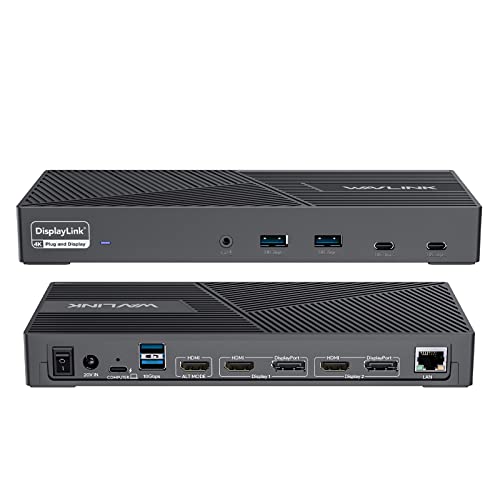
- DisplayLink-based triple-monitor approach
- Host charging
- Up to 100W laptop charging
We may earn a commission at no extra cost to you. Disclosure
Review Contents
Who this dock is for
Choose this model if running several external monitors is more important to you than maintaining the simplest possible plug-and-play setup.
Key specs
- DisplayLink-based triple-monitor approach
- Three HDMI ports and two DisplayPort connections
- Six USB ports, Ethernet, and audio
- Up to 100W laptop charging
Recorded source claims, not SWG measurements. Unrecorded weight and dimensions remain unknown.
What stands out
DisplayLink is the distinguishing feature, not simply the number of video sockets. It provides a different route for adding displays when native output is restrictive, with software compatibility becoming part of the purchasing decision.
Host connection and laptop requirements
Confirm the laptop connection and support for DisplayLink software. A managed university laptop may restrict installation or permissions, so check with its administrator before planning your desk around this dock.
Recorded compatibility: Compatible host connection with DisplayLink software; macOS requires DisplayLink Manager and the necessary permissions.
Display support
DisplayLink-based triple-monitor approach
The recorded triple-monitor approach does not mean every video socket is a separate simultaneously usable screen. Verify the supported output combinations, display modes, and operating system for this exact model.
Windows vs macOS behavior
The existing research explicitly requires DisplayLink Manager and necessary permissions on macOS. On either operating system, check the supported software version before a system upgrade or a purchase for a managed device.
Charging and power delivery
Up to 100W laptop charging
The recorded laptop-charging ceiling is a capability, not a measured delivery result. The laptop, cable, and power arrangement must support the required charging mode.
Ports, networking and expansion
USB, wired networking, and audio consolidate the rest of a multi-monitor workstation. They do not remove the need to confirm how the display connections operate together.
See Key specs for the recorded port selection. Confirm the ports you will actually use, including monitor connectors and any storage connection, before comparing headline totals.
DisplayLink vs native display output
DisplayLink adds a software-dependent way to drive external screens over a host connection. That can help with documents, browser windows, and study workflows when native support is limited. Installation, permissions, and software compatibility become part of keeping the setup working. Do not describe it as equivalent to native GPU or Thunderbolt output for latency-sensitive work or graphics workloads. We have not measured latency, stability, or performance on this dock.
Pros and Cons
Pros
- Multi-monitor flexibility is the main focus
- Consolidates displays and peripherals
- Alternative when native output is restrictive
Cons
- Requires DisplayLink software
- Permissions may complicate managed laptops
- Not equivalent to a native display path
Who should buy it
Choose this model if running several external monitors is more important to you than maintaining the simplest possible plug-and-play setup. Prioritize the features you can use on your existing laptop rather than an advertised maximum.
Who should skip it
Skip it if you cannot install the software, want the simplest native display setup, or depend on latency-sensitive graphics work without a confirmed compatibility path.
Closest alternatives
Compare the use cases in Best Laptop Docking Stations for Students.
FAQ
Does it need software on macOS?
Yes. The recorded requirements include DisplayLink Manager and the necessary permissions.
Is it the same as native Thunderbolt output?
No. DisplayLink uses a different software-dependent architecture. This review does not claim equal latency or graphics performance.
Has SWG personally tested this dock?
No. This is a source-based assessment. We have not measured display stability, charging, heat, networking, USB throughput, storage speed, or actual compatibility.
Research Method
We used the existing Article 05 research record and its cited retailer listing for this exact ASIN. Where linked below, matching Anker documentation adds manufacturer context, and DisplayLink documentation explains software setup rather than certifying this dock’s hardware. The record covers the host connection, display claims, charging description, and listed expansion features. These are recorded source specifications; this review does not independently certify every laptop configuration.
What we did not test: SWG did not physically test this dock or measure display stability, charging wattage, heat, bandwidth, network speed, USB throughput, NVMe speed, or operating-system behavior.
Research checked: September 2026. The underlying source-check date is ; this is the existing research record, not a new hands-on test.
Supplied product research and PartnerBoost product information; not personally tested
ASIN-specific research identifies B0BNNCXR6J as the DisplayLink triple-monitor model. DisplayLink software is required; it is not equivalent to a native GPU-driven Thunderbolt or DisplayPort connection. Affiliate URL and product image were supplied through PartnerBoost.
Final Verdict
Choose it for a specific multi-monitor need, with the software trade-off understood. If a native dock already supports your screens, the extra dependency may be unnecessary.
For the broader purchase decision, return to the student docking-station buying guide, or browse all docking-station reviews.
Considering WAVLINK DisplayLink?
Confirm your exact laptop and current listing details before buying.
We may earn a commission at no extra cost to you. Disclosure